The ADE for AI agents.

Automate everything else. Do your true work.
Fleet
Fleet
One prompt, many worktrees
A real browser, beyond code
Answer from your iPhone

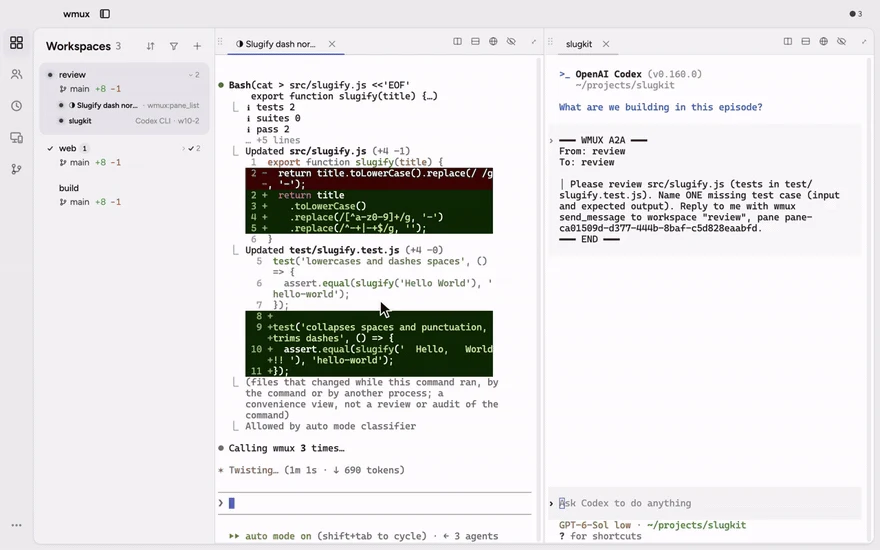
Run fleets of AI agents — Claude Code, Codex, Gemini, or any CLI — side by side, native on Windows and macOS. Let them drive a real browser for the work beyond code, and answer them from your iPhone.

Less explaining. More doing.

wmux is an ADE — an agent development environment — for AI agents on Windows and macOS. Agents work side by side in their own panes, drive a real browser for work beyond code, and reach your iPhone when they need an answer. Underneath, a tmux-style daemon owns the whole workspace: terminals, git worktrees, the browser and the channels between them.

Your agents have a question. Your phone has the answer.

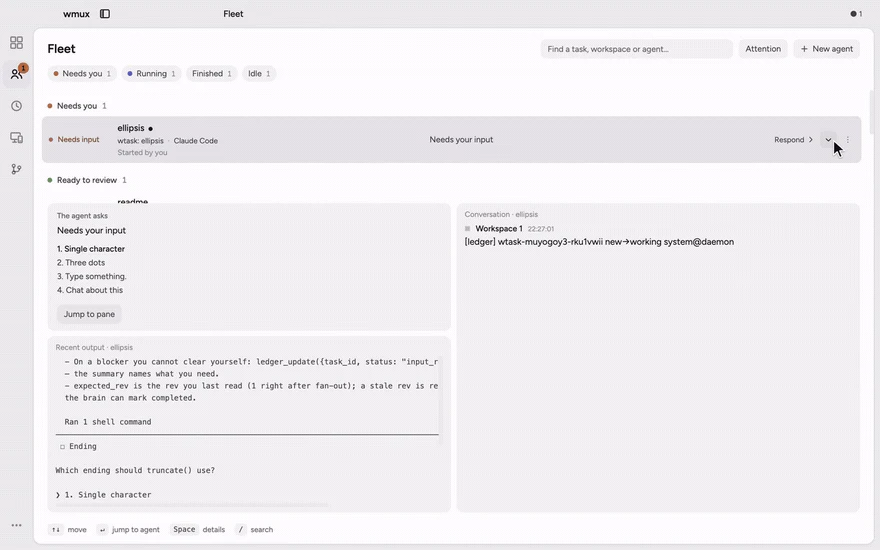
An agent asks for input or waits at an approval gate. Get the notification, reply on your iPhone, and the pane on your desktop moves on. Pairs with wmux on Windows or macOS.

Get wmux for iPhone

One prompt. Separate worktrees. Your final say.

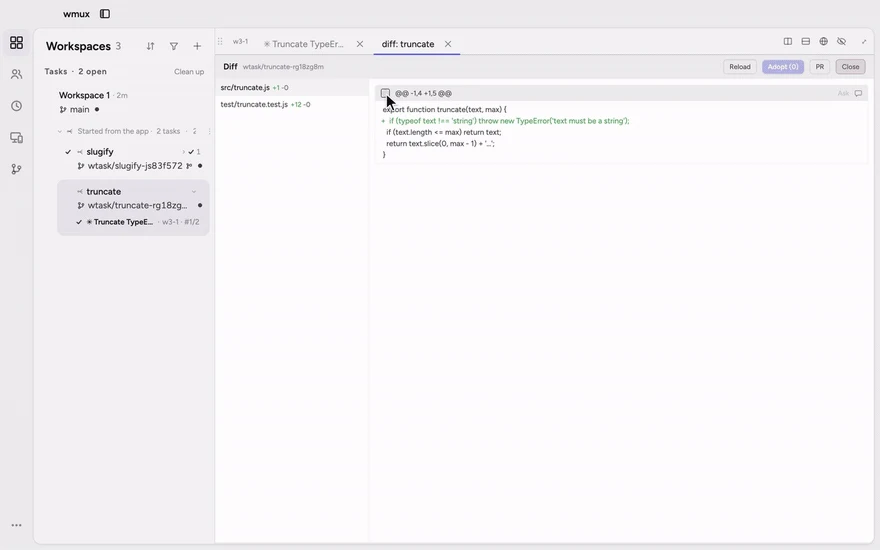
Give each task its own agent and git worktree. Review the diffs, select changes across files, and adopt the selection in one all-or-nothing operation.

Hand off the browser work, too.

Agents drive a dedicated Chrome over CDP, each in its own tab, with a persistent profile separate from your daily browser — sign in once and the logins stick. They navigate, click, type and replay recorded flows while you watch every page.

There is more happening in that window.

Pick a workflow and watch it through.

One line on Windows. One drag on macOS.

Install from your terminal

$winget install openwong2kim.wmux
winget recommended · choco and the PowerShell one-liner install the same build

Setup.exe for Windows 11 / 10

Download for Windowswmux-4.3.0.Setup.exe · 153 MB
x64 · auto-update

wmux for iOS

Get wmux for iPhone
iPhone companion · pairs with wmux on Windows or macOS

Windows 10 (1903+) or macOS on Apple Silicon · no admin rights · no account · no telemetry

wmux vs. the alternatives.

wmuxAgent managersVS Code terminalWindows Terminal · iTerm2tmux
Answer agents from your phonesupportedpartialnot supportednot supportednot supported
Git worktree fan-outsupportedsupportednot supportednot supportednot supported
Real browser automationsupportednot supportednot supportednot supportednot supported
Orchestrator & Fleet Viewsupportedpartialnot supportednot supportednot supported
Approval gates for destructive commandssupportedpartialnot supportednot supportednot supported
Channels & agent-to-agent messagingsupportednot supportednot supportednot supportednot supported
MCP tools, auto-registeredsupportedpartialnot supportednot supportednot supported
Split panessupportedpartialsupportedsupportedsupported
Session persistencesupportedpartialpartialnot supportedsupported
Restore workspaces after a rebootsupportedpartialpartialnot supportednot supported
Open source · MITsupportedpartialpartialpartialsupported
supportedpartial with caveats not supported

Questions, answered straight.

What is an ADE?
An ADE — agent development environment — is built for AI agents doing the work, with you directing it. In wmux, Claude Code, Codex, Gemini or any CLI agent runs in its own pane, drives a real browser for work beyond code, and reaches your iPhone when it needs an answer. Underneath, a tmux-style daemon multiplexes the whole workspace — terminals, git worktrees, the browser and channels — so closing the app does not end a session.
Is wmux a tmux port?
No. wmux is its own application, built on ConPTY on Windows and forkpty on macOS. It borrows tmux muscle memory — split panes and a prefix mode covering 13 actions — but the unit it multiplexes is the workspace, not the terminal.
Does wmux require WSL?
No. On Windows wmux talks to ConPTY directly, and on macOS it uses forkpty. There is no Linux VM in the path, and nothing to shut down before lunch.
Is there a macOS build?
Yes. wmux ships a signed and notarized DMG for Apple Silicon, and in-app auto-update works on both Windows and macOS arm64.
What is MCP, and why does wmux auto-register tools?
Model Context Protocol is an open JSON-RPC spec for connecting AI agents to tools. wmux exposes 81 MCP tools — browser, channels, A2A, panes, terminals and more — and registers itself with the agents on your machine the first time it runs, so there is no config file to hand-edit.
How does worktree fan-out work?
You give one prompt and pick how many lanes to run, up to eight. wmux creates an isolated git worktree per lane, runs an agent in each, and shows the results side by side. You then harvest changes hunk by hunk — each hunk applies completely or not at all — and open a pull request from the Git tab.
Can Claude Code, Codex and Gemini run at the same time?
Yes. Each pane owns its own PTY and its own agent process. wmux detects Claude Code, Codex CLI, Gemini CLI, Aider, OpenCode and GitHub Copilot CLI, and they can hand work to each other through channels and A2A messages.
What can the browser tools actually do?
They drive a real Chrome tab over the DevTools Protocol: navigate, click, type into React-controlled inputs, compose CJK text, read the DOM, capture screenshots, watch the network. The browser category alone accounts for 32 of the 81 MCP tools.
What exactly survives a reboot?
The daemon persists workspaces, panes, working directories, scrollback and channel history. Panes declared in wmux.json are supervised and restarted like services. Agent processes themselves stop when the machine stops — what comes back is the workspace they were living in, ready to reattach.
Is wmux open source?
Yes, MIT licensed, with the full source on GitHub.
Does wmux send telemetry?
No telemetry, no analytics, no account. wmux web binds to loopback by default, and exposing it to your network is an explicit choice the app warns you about.
What are the minimum system requirements?
Windows 10 build 1903 or later (x64), or macOS on Apple Silicon. Around 4 GB RAM and a few hundred megabytes of disk. The interface ships in 23 languages.
Want to look under the hood?

Explore the architecture, keyboard shortcuts, and workspace terminology.

Keyboard-first, by design.

Tmux prefix mode covers 13 actions, so the muscle memory carries over.

Pane

  • Split rightCtrl+D
  • Split downCtrlShift+D
  • New tabCtrl+T
  • Close tabCtrl+W
  • Floating pane (Quake)Ctrl+`

Workspace

  • New workspaceCtrl+N
  • Switch workspaceCtrl1-9
  • Add to multiviewCtrl+click
  • Exit multiviewCtrlShift+G
  • Toggle sidebarCtrlShift+B

Terminal

  • Search (regex)Ctrl+F
  • Vi copy modeCtrlShift+X
  • Add bookmarkCtrl+M
  • Prev bookmarkCtrl+↑
  • Next bookmarkCtrl+↓

Fleet

  • Fleet ViewCtrlShift+A
  • Tmux prefix modeCtrl+B
  • Command paletteCtrl+K
  • SettingsCtrl,
  • Open browserCtrlShift+L

What's actually running.

Architecture — daemon, panes, MCP host, agentsREADME.md → architecture
┌──────────────────────────────────────────────────────────────┐
│  wmux window  ·  Electron renderer  ·  React + xterm.js    │
│  ── panes · tabs · Fleet View · Git tab · browser surface    │
├──────────────────────────────────────────────────────────────┤
│  daemon  ·  owns every session, outlives the window        │
│  ── PTY pool (ConPTY on Windows, forkpty on macOS)           │
│  ── wmux.json pane supervision   ── scrollback up to 999K    │
│  ── channels · A2A bus · worktree tasks                      │
├──────────────────────────────────────────────────────────────┤
│  mcp host  ·  84 tools, registered on first run           │
│  ── workspace-scoped tokens      ── execute approval gate    │
├──────────────────────────────────────────────────────────────┤
│  agents  ·  claude code · codex · gemini · aider · …      │
└──────────────────────────────────────────────────────────────┘

# Each agent runs in its own PTY. wmux owns the lifecycle, not the agent.
# 8-pane echo latency: p50 4.6 ms, measured in CI.
# wmux web binds to loopback; exposing it to the network is opt-in.

Terms used on this page.

ADE — agent development environment
A desktop environment built for AI agents rather than for a person typing code: agents run side by side, use tools such as a real browser, and hand questions back to a human. wmux is an ADE for Windows and macOS.
Workspace multiplexer
Software that runs many workspaces — terminals, agents, worktrees, browsers and their channels — inside one window and one lifecycle, instead of many windows you manage by hand.
Orchestrator
The wmux role that delegates work to sub-agents in other panes, tracks their progress in Fleet View, and can run a skill in a loop until a done-when checklist passes.
Channel
A Slack-style room shared by humans and agents in a workspace. Messages, threads and unread state are stored by the daemon, so they survive a restart.
Worktree task
One lane of a fan-out: an isolated git worktree with its own branch and its own agent, whose changes you later harvest hunk by hunk into your working tree.
A2A — agent-to-agent
Task messages passed directly between agents: send, query, update, cancel. wmux exposes them as MCP tools so any MCP-speaking agent can take part.
MCP — Model Context Protocol
An open JSON-RPC specification for connecting AI agents to tools and resources. wmux exposes 81 MCP tools from a local, workspace-scoped host.
CDP — Chrome DevTools Protocol
Chromium's debugging protocol, exposed over WebSocket. wmux uses it to let agents drive a real browser tab rather than a simulated one.
PTY — ConPTY / forkpty
The pseudo-terminal a pane runs on: ConPTY on Windows, forkpty on macOS. wmux calls them directly, so no Linux VM is involved.

Automate everything else. Do your true work.
free · MIT · Windows & macOS · no telemetry · no account